
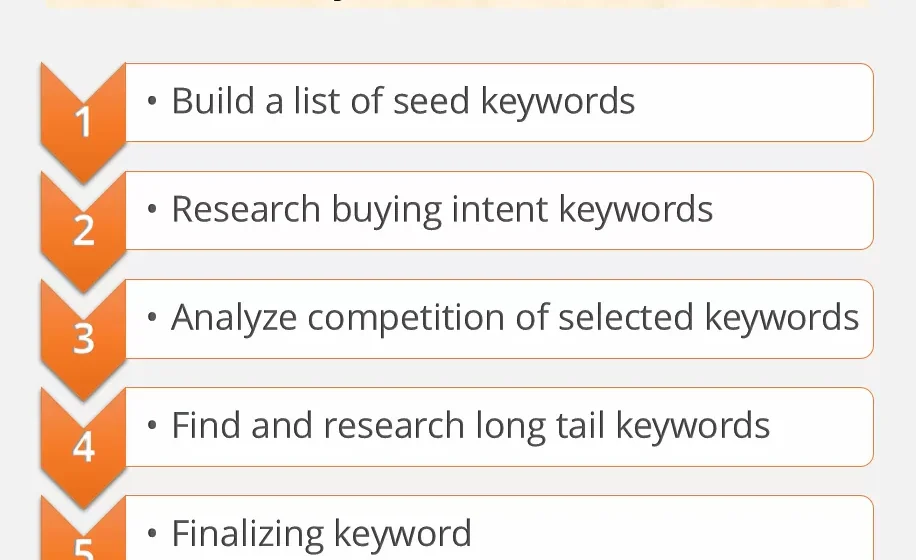
7 Easy Steps to Do Keyword Research Successfully
I used to spend three hours writing a blog post and then just… publish it.
No research. No strategy. Just vibes.
You can guess what happened. Zero traffic. Not even my mom found those posts on Google.
It was frustrating. I kept reading guides that said “just do keyword research” but nobody actually explained how to do keyword research step by step in a way that made sense for a beginner. Most tutorials assumed you had a $100/month tool budget and a marketing degree.
I had neither.
So I figured it out the hard way. I tested free tools. I made mistakes. I wasted weeks targeting keywords nobody searched for. And slowly, it started clicking.
Now my articles actually rank. Real people find them. And the whole process takes me less than 20 minutes per post.
This guide is everything I wish someone had told me at the start. No fluff. No jargon. Just the exact steps I use today.
What Is Keyword Research and Why Does It Actually Matter?
Let me give you the simple version.
A keyword is whatever someone types into Google. Keyword research is the process of figuring out which words people actually search for, how often they search for them, and how hard it is to rank for them.
That last part is the piece most beginners skip. And it is the reason most blogs never get traffic.
You could write the best article in the world. But if nobody is searching for that topic, or if a thousand powerful websites already own that keyword, you will not rank. Simple as that.
Keyword research saves you from wasting your time. It tells you exactly what to write, so every article you publish has a real chance of showing up on page one of Google.
In 2026, with Google’s AI-powered search and the rise of AI Overviews (AIO), keyword research has become even more important. Google now tries to understand the full topic behind a search, not just the exact words. That means you need to choose smart keywords AND cover topics thoroughly. This guide will show you how to do both.
Step 1: Start With What You Already Know
Before you open a single tool, grab a piece of paper.
Write down 10 topics your website covers. These are called seed keywords. Think broad here. Do not overthink it.
If your site is about SEO and technology, your list might look like this:
- SEO tips
- keyword research
- on-page SEO
- free SEO tools
- tech guides
- smart home devices
- software reviews
- WordPress tips
- content writing
- Google ranking
That list right there? That is your starting point for everything.
Seed keywords are not what you will rank for directly. They are the doors you walk through to find the real opportunities. Think of them as the first clue in a treasure hunt.
Now move to the next step.
Step 2: Use Google Itself as Your First Tool
Here is a free trick most people completely ignore.
Go to Google. Type one of your seed keywords. Do not press Enter yet.
Look at what Google suggests in the dropdown. Those autocomplete suggestions are real searches that real people typed recently. Google is literally handing you keyword ideas for free.
For example, type “keyword research” and Google might suggest:
- keyword research step by step
- keyword research for beginners
- keyword research free tools
- keyword research for YouTube
- keyword research 2026
Every single one of those is a potential article topic.
Now press Enter and scroll down the page. Look at two more things.
People Also Ask: This box shows questions people ask related to your keyword. These are golden for FAQ sections and subheadings in your articles.
Related Searches at the Bottom: Google shows eight more keyword ideas at the very bottom of the page. These are closely related terms people search for. Screenshot them. They will come in handy later.
This whole process takes five minutes and costs exactly nothing. Do this before you even think about opening a keyword tool.
Step 3: Find Real Search Data With Free Tools
Now it is time to get actual numbers. You need to know how many people search for a keyword and how hard it is to rank for it.
Here are the best free tools available in 2026:
| Tool | What It Gives You | Best For |
|---|---|---|
| Google Keyword Planner | Search volume ranges, competition level | Finding volume data |
| Ubersuggest | Volume, keyword difficulty, ideas | All-around beginner research |
| AnswerThePublic | Question-based keyword ideas | Finding FAQ content |
| KeywordSurfer (Chrome) | Volume shown directly in Google | Quick checks while browsing |
| Google Search Console | Keywords your site already ranks for | Improving existing content |
My personal starting recommendation is Ubersuggest. It is free for a few searches per day and gives you everything you need as a beginner.
Here is exactly how to use it:
- Go to Ubersuggest
- Type your seed keyword, like “keyword research”
- Look at the keyword ideas list it generates
- Check the Search Volume column
- Check the SEO Difficulty (SD) column
- Write down keywords with good volume and low difficulty
That is the whole process. Seriously. It is not complicated once you see it in front of you.
Step 4: Understand the Two Numbers That Matter Most
Every keyword tool shows you a lot of numbers. Most of them do not matter when you are starting out.
Focus on just two.
Search Volume
This tells you how many people search for that keyword per month. Higher volume means more potential traffic. But higher volume also usually means higher competition.
For a brand new website, I target keywords with 100 to 2,000 monthly searches. That range gives you real traffic potential without going up against giant websites.
Keyword Difficulty (KD)
This is a score from 0 to 100. It tells you how hard it is to rank on page one for that keyword. The higher the number, the harder the competition.
Here is a simple guide for beginners:
| KD Score | Difficulty | Good for New Sites? |
|---|---|---|
| 0 to 20 | Very Easy | Yes, start here |
| 21 to 35 | Easy | Yes, great target |
| 36 to 50 | Medium | Possible with good content |
| 51 to 70 | Hard | Only with strong authority |
| 71 to 100 | Very Hard | Not for beginners |
If your site is new, stick to KD under 30. Full stop. Do not let anyone convince you otherwise. I learned this the hard way after spending months writing for keywords I had zero chance of ranking for.
Step 5: Find Long-Tail Keywords That You Can Actually Win
This is the step that changed everything for me.
Long-tail keywords are longer, more specific phrases. They usually have lower search volume. But they also have much lower competition. And here is the best part. People who search long-tail keywords know exactly what they want. That makes them easier to rank for and easier to convert into readers.
Short keyword: “keyword research” — 40,000 searches/month, KD 72. Forget it.
Long-tail keyword: “how to do keyword research for free” — 1,200 searches/month, KD 18. Now we are talking.
Even longer tail: “how to do keyword research step by step for beginners” — 590 searches/month, KD 12. This is a beginner’s dream keyword.
The trick to finding long-tail keywords is combining what you already know:
- Take your seed keyword
- Add words like “how to,” “for beginners,” “step by step,” “free,” “without tools,” “2026,” “for small business”
- Run those combinations through Ubersuggest or Google autocomplete
- Check the difficulty scores
You will find hidden gems that bigger websites completely ignore because the volume looks “too small” to them. For you as a beginner, those are exactly the keywords you want.
Step 6: Check Search Intent Before You Write Anything
This is the step that separates good keyword researchers from great ones.
Search intent means understanding WHY someone is searching for that keyword. What do they actually want?
Google in 2026 is extremely good at matching results to intent. If your content does not match what the searcher wants, Google will not rank it. Even if your keyword research is perfect.
There are four types of intent:
Informational Intent means the person wants to learn something. Example: “how to do keyword research step by step” What to write: A detailed guide like this one.
Navigational Intent means the person is looking for a specific website. Example: “Ubersuggest login” What to write: Nothing. You cannot compete here.
Commercial Intent means the person is comparing options before deciding. Example: “best free keyword research tools 2026” What to write: A comparison article with pros and cons.
Transactional Intent means the person is ready to buy. Example: “buy Semrush subscription” What to write: A review or direct product page.
Here is a simple way to check intent. Google your keyword and look at the top five results. If they are all how-to guides, write a how-to guide. If they are all listicles, write a listicle. Google is already showing you what format works for that keyword. Match it.
Step 7: Build Your Keyword List and Plan Your Content
Now bring everything together.
Open a Google Sheet or Excel file. Create these columns:
| Keyword | Monthly Volume | KD Score | Intent | Priority |
|---|---|---|---|---|
| how to do keyword research step by step | 590 | 12 | Informational | High |
| free keyword research tools 2026 | 880 | 19 | Commercial | High |
| long tail keywords for beginners | 720 | 15 | Informational | High |
| keyword research without tools | 390 | 10 | Informational | Medium |
| best keyword research tool free | 1,100 | 24 | Commercial | High |
Start with your High priority keywords. Write one article per keyword. Never try to target two competing keywords in the same article. That confuses Google and splits your ranking potential.
Here is the rule I follow. One article. One primary keyword. Done.
As you publish more articles, link them to each other naturally. This is called internal linking and it helps Google understand what your site is about. For example, if you write about SEO tips, you can naturally mention and link to your keyword research guide. Just like I covered the full beginner SEO strategy in my guide on SEO tips for beginners at Kainat Techivo.
Common Keyword Research Mistakes Beginners Make
I made all of these. Learn from my pain.
Targeting keywords that are too broad. “SEO” is not a keyword you can rank for as a new site. Go specific. Go long-tail.
Ignoring search intent. You can rank for the right keyword but write the wrong type of content. Always check what Google already ranks for that keyword.
Chasing volume over opportunity. A keyword with 200 monthly searches and KD 8 is better than one with 10,000 searches and KD 75. Every single time.
Changing keywords after publishing. Pick your keyword before you write. Changing it after hurts your content structure and confuses Google.
Not updating your keyword research. Search trends change. What nobody searched for in 2024 might be booming in 2026. Revisit your keyword list every three to four months.
How to Use Keywords Naturally in Your Article
Finding a keyword is only half the job. Using it correctly is the other half.
Here is where your primary keyword needs to appear:
- First paragraph of your article
- One H2 heading (naturally, not forced)
- Two to three times in the body content
- Meta title
- Meta description
- Image alt text
- URL slug
Do not stuff your keyword everywhere. If a sentence sounds weird, rewrite it. Google in 2026 understands context and related terms. Write naturally and cover the topic thoroughly. That matters far more than repeating the exact keyword twenty times.
Use related keywords throughout your article too. For a keyword research article, related terms include: search volume, keyword difficulty, long-tail keywords, search intent, SEO tools, Google ranking, organic traffic, and SERP analysis. Weave these in naturally as you write.
Conclusion
Keyword research felt overwhelming to me at first. I thought it required expensive tools, technical knowledge, and hours of work.
It does not.
The process is simple once you break it down into steps. Start with seed keywords. Use Google’s free suggestions. Check volume and difficulty with a free tool. Target long-tail keywords with low competition. Match your content to search intent. Build a keyword list. Write one article per keyword.
That is it. That is the whole system.
The websites you see on page one of Google are not there by accident. They chose smart keywords, wrote helpful content, and stayed consistent. You can do exactly the same thing.
Start with one keyword today. Write one article. Publish it. Then do it again next week. Six months from now, you will be very glad you started.
Frequently Asked Questions
Q1: How long does keyword research take for one article?
Once you get comfortable with the process, keyword research for a single article takes about 15 to 20 minutes. Beginners may take 30 to 45 minutes at first, but it gets faster with practice.
Q2: Do I need to pay for keyword research tools?
No. Google Keyword Planner, Ubersuggest free tier, AnswerThePublic, and Google Search Console give you everything you need to start. Paid tools offer more data but are not necessary for beginners.
Q3: What is a good search volume for a beginner blogger?
For a new website, target keywords with 100 to 2,000 monthly searches. These keywords have enough traffic potential but far less competition than high-volume terms.
Q4: What is keyword difficulty and what score should I target?
Keyword difficulty (KD) is a score from 0 to 100 that shows how hard it is to rank for a keyword. New websites should target keywords with a KD score below 30 for the best chance of ranking.
Q5: How many keywords should I use in one article?
Use one primary keyword per article. You can naturally include three to five related or secondary keywords throughout the content. Never force keywords into sentences where they sound unnatural.
Q6: What are long-tail keywords and why are they important?
Long-tail keywords are longer, more specific search phrases with lower search volume and lower competition. They are easier to rank for and attract more targeted readers who know exactly what they want.
Q7: How do I know if a keyword is worth writing about?
A keyword is worth targeting if it has decent search volume (100 plus per month), a low difficulty score (under 30 for beginners), and clear search intent that you can match with your content.
Q8: Can I do keyword research without any tools?
Yes. Google autocomplete, People Also Ask, and Related Searches at the bottom of Google results give you real keyword ideas completely free. These methods work well for finding long-tail keyword opportunities.
Q9: How often should I do keyword research?
Do keyword research before writing every single article. Also revisit your overall keyword strategy every three to four months. Search trends shift, and new opportunities appear regularly in every niche.
Q10: What is search intent and why does it matter for keyword research?
Search intent is the reason behind a search. Google matches results to intent. If your content type does not match what searchers want, Google will not rank it even if your keyword is perfect. Always check the top results before writing.