
Ultimate SEO Tips for Beginners to Rank in 2026
Introduction
If you are just starting out, learning SEO tips for beginners in 2026 is one of the smartest moves you can make. Search engine optimization helps your website show up on Google. More visibility means more visitors. More visitors means more growth. But SEO has changed a lot in recent years. Google now uses AI-powered systems to rank pages. It looks at content quality, user experience, and trust signals more than ever. This guide will walk you through every important SEO concept step by step. You do not need to be a tech expert to follow this. By the end, you will have a clear action plan to start ranking your website in 2026.
What Is SEO and Why Does It Matter in 2026?
SEO stands for Search Engine Optimization. It is the process of improving your website so Google ranks it higher in search results. When someone types a question into Google, SEO determines which websites appear first. The higher you rank, the more free traffic you get. In 2026, SEO matters more than ever because paid ads are getting more expensive. Organic search traffic is still the most trusted source of website visits. Studies show that over 70% of people click on organic results instead of ads. If your site does not rank, you are missing out on free, targeted visitors every single day.
How Google Ranks Websites in 2026
Google uses a combination of algorithms and AI systems to rank pages. Its latest systems include Google’s Helpful Content System and the Search Generative Experience (SGE). These systems look for content that genuinely helps people. Google checks your page’s relevance, authority, and experience. It also looks at how users interact with your page. If people click your result and stay on your page, that is a positive signal. If they leave quickly, Google sees that as a bad sign. Understanding these basics helps you create content Google actually wants to rank.
Tip 1: Start With the Right Keyword Research
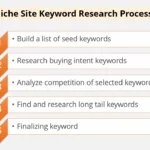
Keyword research is the foundation of SEO for beginners. Before you write anything, you need to know what people are searching for. A keyword is simply the phrase someone types into Google. If you target the wrong keywords, no one will find your content. Start by thinking about your audience. What problems do they have? What questions do they ask? Then use tools to find real search data.
Best Free Keyword Research Tools in 2026
| Tool | Best For | Cost |
|---|---|---|
| Google Search Console | Tracking your existing keywords | Free |
| Google Keyword Planner | Finding new keyword ideas | Free |
| Ubersuggest | Beginner-friendly keyword data | Free / Paid |
| AnswerThePublic | Finding question-based keywords | Free tier available |
| Semrush Free Version | Competitor keyword analysis | Free tier available |
How to Find Low Competition Keywords
Low competition keywords are easier to rank for as a beginner. Look for keywords with decent search volume but low keyword difficulty. A good beginner target is keywords with a difficulty score below 30. Long-tail keywords work best for new websites. These are longer, more specific phrases like “best free SEO tools for bloggers 2026.” They have lower competition and higher intent. People searching long-tail keywords usually know exactly what they want. That makes them easier to convert into readers or customers.
Understanding Search Intent
Search intent is what the user actually wants when they type a keyword. Google in 2026 is extremely good at understanding intent. There are four main types of intent you need to know.
- Informational intent means the person wants to learn something. Example: “what is SEO.”
- Navigational intent means they want a specific website. Example: “Google Search Console login.”
- Commercial intent means they are comparing options. Example: “best SEO tools 2026.”
- Transactional intent means they are ready to buy. Example: “buy Semrush subscription.”
Always match your content to the right intent. If someone wants information, give them a detailed guide. Do not try to sell them something on an informational page.
Tip 2: Optimize Your On-Page SEO Properly
On-page SEO is everything you do directly on your webpage to help it rank. This includes your title, headings, content, images, and internal links. On-page SEO is fully in your control. That makes it one of the best places to start.
Writing an SEO-Friendly Title Tag
Your title tag is the headline that appears in Google search results. It is one of the most important on-page SEO factors. Every page needs a unique title tag. Include your main keyword near the beginning of the title. Keep it under 60 characters so it does not get cut off in search results. Make it interesting enough that people want to click. A good title tag balances the keyword with a compelling reason to click.
Using Headings the Right Way
Headings help both Google and readers understand your content structure. Use one H1 heading per page. Your H1 should include your main keyword naturally. Use H2 headings for main sections. Use H3 headings for subsections within those sections. Do not skip heading levels. This structure signals to Google what your page is about. It also makes your content easier to read and scan.
Writing SEO-Optimized Content
Content is still king in 2026. Google wants content that is helpful, accurate, and written for humans. Aim for a minimum of 1000 words for most blog posts. Cover the topic thoroughly so readers do not need to go anywhere else. Use your primary keyword in the first paragraph. Sprinkle related or semantic keywords throughout naturally. Do not stuff keywords. That hurts your rankings. Write like you are explaining something to a friend.
Optimizing Your Meta Description
The meta description appears below your title in search results. It does not directly affect rankings, but it affects clicks. A good meta description tells people exactly what your page covers. Include your main keyword. Keep it under 160 characters. End with a call to action like “Learn more” or “Find out how.” A compelling meta description can increase your click-through rate significantly.
Image Optimization for SEO
Images make your content more engaging. But they also need SEO optimization. Rename your image file with your keyword before uploading. Example: “seo-tips-beginners-2026.jpg.” Always add alt text to every image. Alt text helps Google understand what the image shows. It also helps visually impaired users. Compress images before uploading to keep your page fast. Large images slow down your site, and slow sites rank lower.
Tip 3: Focus on Technical SEO Basics
Technical SEO sounds scary but the basics are simple. It covers the behind-the-scenes elements that help Google crawl and index your site. You do not need to be a developer to handle the fundamentals.
Page Speed Matters More Than Ever
Google uses page speed as a direct ranking factor. In 2026, with more people browsing on mobile, speed is critical. Use Google PageSpeed Insights to test your website for free. A score above 80 is good. Compress images, use a fast hosting provider, and enable browser caching. These three steps alone can dramatically improve your load time.
Make Your Website Mobile-Friendly
Over 60% of all searches now happen on mobile devices. Google uses mobile-first indexing. That means Google looks at your mobile site first when ranking. Use a responsive WordPress theme that adjusts to all screen sizes. Test your site on your phone regularly. Check that text is readable without zooming. Make sure buttons are easy to tap. A poor mobile experience will hurt your rankings no matter how good your content is.
Set Up HTTPS Security
Google favors secure websites. HTTPS means your site has an SSL certificate installed. If your site shows “Not Secure” in the browser, visitors will leave. Most hosting providers offer free SSL through Let’s Encrypt. Install it today if you have not already. This is a simple but essential SEO signal.
Submit Your Sitemap to Google
A sitemap is a file that lists all the pages on your website. Submitting it to Google helps Google find and index your content faster. Install a plugin like Yoast SEO or Rank Math if you use WordPress. These plugins create your sitemap automatically. Then submit it through Google Search Console. This is a free tool from Google that every website owner needs.
Tip 4: Build Quality Backlinks
Backlinks are links from other websites pointing to yours. Google sees them as votes of trust. The more quality backlinks you have, the more authority your site gains. But in 2026, quality matters far more than quantity. One backlink from a trusted website is worth more than 100 links from random blogs.
How to Get Your First Backlinks as a Beginner
Getting backlinks feels hard when you are starting out. Here are practical methods that work in 2026.
Guest posting means writing articles for other websites in your niche. You get a link back to your site in your author bio or within the content. Reach out to blogs that accept guest posts in your category.
Resource link building means creating a genuinely useful resource. Tools, guides, statistics, or original research attract natural links. Other writers link to useful resources when they write articles.
Fixing broken links is another great method. Find websites in your niche with broken outbound links. Offer your content as a replacement. Tools like Ahrefs’ Broken Link Checker can help you find these opportunities.
Social sharing does not create backlinks directly, but it increases visibility. More visibility leads to more natural links over time.
What to Avoid with Backlinks
Never buy backlinks. Google penalizes websites that engage in link schemes. Avoid low-quality directory links. Do not use private blog networks (PBNs). These shortcuts can get your site removed from Google entirely. Focus on earning links the right way. It takes longer but it lasts forever.
Tip 5: Create a Strong Content Strategy
Content strategy means planning what you write and why. Random articles with no direction will not rank. You need a focused plan based on your niche and audience. A good content strategy targets a clear set of keywords and covers topics your audience actually cares about.
The Pillar and Cluster Content Model
This model is very effective for beginners in 2026. A pillar page is a long, comprehensive guide on a broad topic. For example, “Complete SEO Guide for Beginners.” Cluster pages are shorter articles that cover specific subtopics. For example, “How to Do Keyword Research” or “What Is a Backlink.” Each cluster page links back to the pillar. This structure helps Google understand your site’s topical authority. It also keeps visitors on your site longer.
How Often Should You Publish?
Consistency matters more than frequency. Publishing two high-quality articles per week is better than publishing five mediocre ones. Focus on depth over speed. A 2000-word article that fully answers a question will outperform ten 300-word posts every time. Google in 2026 rewards comprehensive content that satisfies user intent completely.
Updating Old Content
Updating old articles is one of the fastest ways to improve rankings. Go back to your older posts. Add new information. Update outdated statistics. Improve the structure. Add internal links to newer posts. Google rewards fresh content. A refreshed article can jump several positions in search results very quickly.
Tip 6: Use Internal Linking Smartly
Internal links connect your own pages together. They help Google discover more of your content. They also keep visitors browsing your site longer. Both of these things improve your SEO.
When you write a new post, always link to at least two or three related articles on your site. Use natural anchor text that describes what the linked page is about. For example, if you write about smart home technology, you can naturally link to an article like how smart home technology will change lives . Do not use generic anchor text like “click here.” That tells Google nothing useful about the linked page.
Tip 7: Understand and Apply E-E-A-T
E-E-A-T stands for Experience, Expertise, Authoritativeness, and Trustworthiness. Google uses these signals to evaluate content quality. In 2026, E-E-A-T has become one of the most important factors for ranking, especially in competitive niches.
How to Improve Your E-E-A-T
Experience means showing you have real, first-hand knowledge of your topic. Share personal examples and original insights in your writing.
Expertise means demonstrating deep knowledge. Cover topics thoroughly. Cite credible sources. Reference studies and data.
Authoritativeness grows over time through backlinks and mentions from trusted sites. Publishing consistent, high-quality content builds authority naturally.
Trustworthiness comes from transparency. Have an About page. Show author names and bios. Include contact information. Make sure your site has privacy policy and disclaimer pages. If you run an informational site about software or SEO like Kainat Techivo, showing who writes your articles builds trust immediately.
Tip 8: Optimize for Google’s AI-Powered Search in 2026
Google’s AI Overview (AIO) feature now appears at the top of many search results. It pulls information from trusted pages and shows summaries directly in search. To appear in AIO results, your content needs to be structured clearly. Use short, direct sentences. Answer questions clearly at the start of each section. Use headers that match common questions. Write in plain language.
Also, voice search is growing in 2026. More people use AI assistants like Google Assistant to search. Optimize for conversational phrases. Include natural question-and-answer formats in your content. This matches how people speak when using voice search.
Tip 9: Track Your SEO Progress
You cannot improve what you do not measure. Set up Google Search Console and Google Analytics 4 on your website immediately. These two free tools give you everything you need to track your SEO performance.
Key Metrics to Watch
| Metric | What It Tells You |
|---|---|
| Organic Impressions | How often your site appears in search |
| Click-Through Rate (CTR) | How many people click your result |
| Average Position | Where you rank for each keyword |
| Bounce Rate | How many visitors leave quickly |
| Pages Per Session | How many pages each visitor views |
Check your Search Console data at least once a week. Look for pages that have high impressions but low clicks. These are pages where improving your title tag or meta description can bring quick wins.
Tip 10: Be Patient and Stay Consistent
SEO is not a quick fix. New websites typically take three to six months to see significant organic traffic. This is normal. Google needs time to discover, crawl, and trust your content. The worst thing you can do is give up after a few weeks. The best thing you can do is keep publishing quality content, keep building links, and keep improving your pages.
Stay updated with SEO news. Google updates its algorithm hundreds of times per year. Follow trusted sources like Google Search Central Blog and Search Engine Journal to stay current. Understanding algorithm changes helps you adapt quickly.
Common SEO Mistakes Beginners Make
Avoiding mistakes is just as important as following best practices. Here are the most common errors beginners make.
Targeting keywords that are too competitive. New sites cannot compete with established authorities right away. Start with low-competition, long-tail keywords and build up.
Ignoring technical SEO. A slow, broken website will not rank no matter how good the content is. Fix technical issues early.
Not building any backlinks. Content alone is rarely enough. You need links from other sites to build authority.
Keyword stuffing. Repeating your keyword unnaturally many times hurts your rankings. Write for humans first.
Not having a mobile-friendly site. With mobile-first indexing, a poor mobile experience is a serious ranking problem.
Skipping internal links. Many beginners forget to link their own articles together. This slows down how Google discovers your content.
SEO Tools Every Beginner Needs in 2026
You do not need expensive tools to start. These tools will cover your needs completely as a beginner.
| Tool | Purpose | Cost |
|---|---|---|
| Google Search Console | Track rankings and indexing | Free |
| Google Analytics 4 | Track traffic and user behavior | Free |
| Yoast SEO or Rank Math | On-page optimization for WordPress | Free / Paid |
| Ubersuggest | Keyword research and site audit | Free tier |
| Canva | Creating optimized images | Free tier |
| TinyPNG | Compressing images for speed | Free |
Conclusion
Learning SEO in 2026 is one of the best investments you can make for your website. The process takes time, but every step you take builds a stronger foundation. Start with solid keyword research. Optimize your on-page elements carefully. Fix technical issues on your site. Build quality backlinks over time. Create helpful, thorough content consistently. Track your results and keep improving. SEO is not magic. It is a system. Follow the system, stay patient, and you will see results. The websites that rank on page one today are simply the ones that applied these principles consistently over time. Now it is your turn to do the same.
Frequently Asked Questions
Q1: How long does SEO take to show results for a new website?
Most new websites start seeing noticeable SEO results within three to six months. The exact timeline depends on your niche competition, content quality, and how actively you build backlinks.
Q2: Do I need to pay for SEO tools as a beginner?
No. Google Search Console, Google Analytics, and the free versions of Ubersuggest are enough to get started. Paid tools offer more data, but free tools cover all the basics for beginners.
Q3: How many keywords should I target on one page?
Focus on one primary keyword per page. You can naturally include two to four related or semantic keywords throughout the content. Targeting too many keywords on one page confuses Google.
Q4: What is the most important SEO factor in 2026?
Content quality combined with E-E-A-T signals is the most important factor. Google wants helpful, trustworthy, expert content that fully satisfies what the user is searching for.
Q5: Can I do SEO myself without hiring an agency?
Absolutely. Thousands of website owners do their own SEO successfully. This guide gives you everything you need to start. As your site grows, you may want professional help, but starting on your own is completely achievable.
Q6: What is the difference between on-page and off-page SEO?
On-page SEO covers everything you control on your website, like content, titles, and headings. Off-page SEO covers things outside your site, like backlinks and social mentions. Both are necessary for strong rankings.
Q7: How important is website speed for SEO?
Page speed is a confirmed Google ranking factor. A slow website frustrates users and signals poor quality. Aim for a load time under three seconds. Use Google PageSpeed Insights to identify and fix speed issues for free.
Q8: Should I focus on Google only or other search engines too?
Google holds over 90% of the global search market. Focusing on Google first makes the most sense for beginners. Once you rank well on Google, you will naturally rank on Bing and other engines too.
Q9: What are semantic keywords and why do they matter?
Semantic keywords are related terms and phrases that support your main keyword. For example, for “SEO tips for beginners,” semantic keywords include “how to rank on Google,” “keyword research guide,” and “on-page optimization.” Using them naturally helps Google understand your content depth.
Q10: Is blogging still effective for SEO in 2026?
Yes, blogging remains one of the most powerful SEO strategies. Consistent blog content helps you target new keywords, earn backlinks, and build topical authority. The key is quality and consistency over quantity.