software Audio Console The Complete Guide 2026
Introduction
The world of audio production has changed faster in the last two years than in the previous decade. A software audio console is now the backbone of modern sound engineering. Whether you produce music in a bedroom studio or manage a touring live sound rig, this technology shapes your entire workflow.
In 2026, software audio consoles are smarter, faster, and more affordable than ever before. Artificial intelligence now assists with gain staging, noise removal, and mix suggestions. Cloud collaboration lets two engineers mix the same session from opposite sides of the world.
This guide covers everything you need to know about software audio consoles in 2026. We explain what they are, how they work, what features matter most right now, and which platforms lead the market today. We also cover setup tips, common mistakes, and answers to the most frequently asked questions.
By the end of this guide, you will feel confident choosing and using the right digital audio console for your goals. Let us get into it.
What Is a Software Audio Console in 2026?
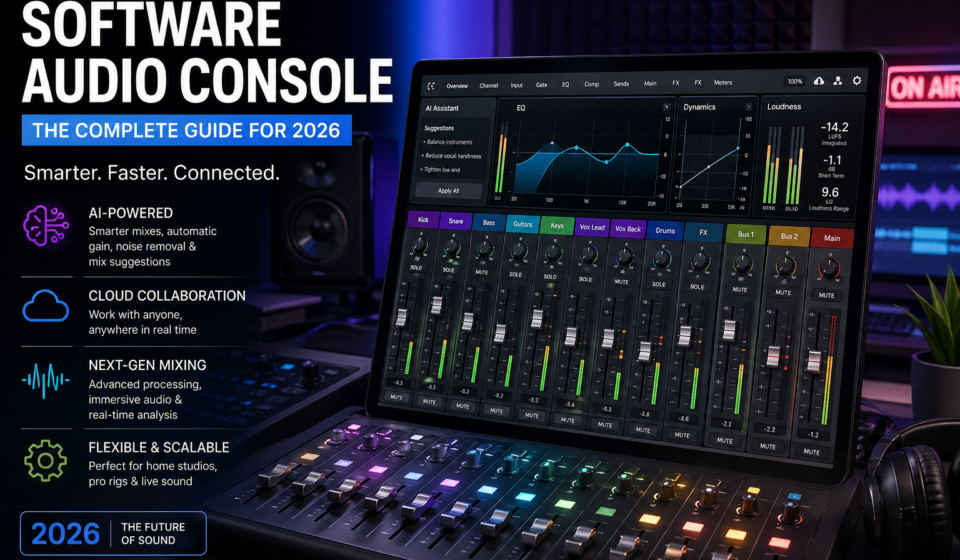
A software audio console is a computer-based application that replicates and extends the functions of a hardware mixing board. It handles signal routing, level control, equalization, dynamics, effects processing, and metering. Everything happens digitally, inside your computer.
What makes 2026 different from earlier years is the depth of intelligence built into these tools. Modern virtual mixing consoles do not just route audio. They analyze your mix in real time, suggest adjustments, and even automate repetitive tasks like gain riding and background noise suppression.
The core function remains the same. Audio enters through an input channel. It moves through processing stages. Then it exits through a bus to your speakers, recording device, or streaming destination. But the path between entry and exit is now packed with intelligent tools that were unimaginable just five years ago.
Cloud connectivity has also redefined what a software audio console can do. Engineers save sessions to shared servers. Clients listen to mixes through secure streaming links in real time. Remote collaboration has become standard practice across the entire industry.
From solo podcasters to major-label recording studios, a software audio console in 2026 serves every level of audio professional. The gap between hobbyist tools and professional-grade platforms has narrowed significantly this year.
How a Software Audio Console Works: The Signal Chain Explained
Understanding the Signal Flow
Every software audio console follows a defined signal path. Audio enters at the input stage. The preamp gain control amplifies or reduces the incoming signal level. After gain, the signal passes through the channel processing section.
The channel processing section typically includes a high-pass filter, a parametric equalizer, a compressor, and a gate. These tools shape the sound of each individual audio source. After channel processing, the signal travels to a bus or a master fader.
The master fader controls the overall output level of your entire mix. Everything you hear in your speakers or record to a file passes through the master section. Keeping this stage clean and well-managed is critical to a professional-sounding result.
Virtual Channels and Buses in 2026
Modern software audio consoles offer virtually unlimited channel counts. Unlike hardware boards that cap at a fixed number of strips, software versions expand based on your computer’s processing capacity. Sessions with 200 or more tracks are now common in film and music production.
Buses group related channels together for shared processing. A drum bus handles all percussion tracks. A dialogue bus manages all spoken word. Grouping channels this way keeps sessions organized and allows fast, efficient mix adjustments.
Aux sends and return channels handle effects routing. You send signal from multiple channels to a shared reverb or delay processor. The processed signal returns on a separate channel. This approach saves CPU resources and keeps your mix cohesive.
AI-Assisted Mixing in 2026
Artificial intelligence integration is the biggest shift in audio mixing software this year. AI-powered gain staging analyzes incoming signal levels and suggests optimal settings in seconds. This task used to take an experienced engineer 20 to 30 minutes to complete manually.
AI noise reduction now happens at the channel level in real time. Tools like iZotope RX 11 and NVIDIA RTX Voice work inside your virtual soundboard to strip out background noise before it enters your mix. The results in 2026 are genuinely impressive compared to earlier versions.
Some platforms now offer AI mix matching. You upload a reference track. The software analyzes its frequency balance, dynamics, and loudness. It then applies corrective processing to bring your own mix closer to that target. This does not replace skilled engineering, but it speeds up the rough balancing stage.
Key Features to Look for in a 2026 Software Audio Console
The feature set of software audio consoles expanded greatly in 2026. Knowing which features matter for your specific use case saves you money and prevents frustration. Here is a breakdown of the most important elements to evaluate.
| Feature | What It Does | Why It Matters in 2026 |
|---|---|---|
| AI-Assisted Gain Staging | Automatically sets optimal input levels | Saves time and reduces clipping errors |
| Cloud Session Sync | Saves sessions to a shared cloud server | Enables real-time remote collaboration |
| Spatial Audio Support | Handles Dolby Atmos and Sony 360 formats | Essential for streaming platform delivery |
| Low Latency Processing | Reduces delay between input and output | Critical for live monitoring and performance |
| Unlimited Tracks | No channel count ceiling | Supports large orchestral and film sessions |
| Plugin Compatibility | Supports VST3, AU, and AAX formats | Works with your existing plugin library |
| Hardware Control Support | Integrates with physical control surfaces | Adds tactile feel to digital mixing |
| Stem Export Tools | Creates grouped mix exports easily | Speeds up delivery to mastering engineers |
| Integrated Metering | Shows peak, RMS, LUFS, and true peak | Ensures streaming platform compliance |
| Mobile Remote Control | Adjust mix from a phone or tablet | Gives engineers freedom to move around |
Spatial Audio: The 2026 Must-Have Feature
Spatial audio support has moved from optional to essential in 2026. Every major streaming platform now accepts or actively prefers Dolby Atmos and immersive audio formats. Artists and labels expect their engineers to deliver these formats as standard.
A software audio console with built-in spatial audio tools handles object-based mixing inside your existing session. You position sound elements in a three-dimensional space. The mix translates across headphones, speaker arrays, and home theater systems.
Not every console handles spatial audio equally well. Pro Tools Ultimate, Logic Pro 11, and Nuendo 14 currently lead the field for Atmos mixing. Verify that your chosen platform holds a Dolby Atmos certification before committing to immersive audio projects.
Cloud Collaboration Tools
Cloud-native audio production software gained enormous adoption between 2024 and 2026. Teams now work on shared sessions without emailing large audio files back and forth. Changes appear in near real time for all collaborators logged into the same session.
Platforms like Splice Studio, Soundtrap, and the cloud features inside Logic Pro 11 lead this movement. Security matters here. Confirm that any cloud-connected audio control software uses end-to-end encryption before uploading client recordings.
Best Software Audio Console Platforms in 2026
The software audio console market in 2026 has several dominant players. Each serves different needs and budgets. Below we review the most important options available this year with current pricing and feature sets.
1. Pro Tools Ultimate 2026 by Avid
Pro Tools remains the undisputed standard in professional recording studios and post-production facilities worldwide. The 2026 release introduced AI-assisted editing tools that dramatically speed up dialogue cleanup and music editing tasks.
Pro Tools Ultimate now supports full Dolby Atmos mixing natively without third-party bridges. The revised Flex Pitch and Elastic Audio engines handle time and pitch manipulation more accurately than previous versions. The built-in digital audio console section received a visual refresh that improves readability on high-resolution displays.
The subscription pricing sits at approximately $34 per month for the standard plan. The Ultimate tier, required for full Atmos and advanced features, runs around $100 per month. A perpetual license option returned in 2025 after user feedback. It costs a one-time fee in the range of $600 for the base version.
2. Logic Pro 11 by Apple
Logic Pro 11 landed in late 2025 with significant updates that strengthened its position as the best value software audio console for Mac users. The new AI stem separation tool lets you isolate vocals, drums, bass, and other elements from any stereo recording directly inside a session.
The virtual mixing console in Logic Pro 11 received Smart Gain, an AI tool that analyzes all tracks and applies corrective gain staging before you begin mixing. This feature alone saves engineers significant setup time on every project.
Logic Pro 11 costs a one-time purchase of $199.99 on the Mac App Store. Apple Silicon optimization in 2026 means it runs extraordinarily well on M3 and M4 MacBook Pro systems. It remains one of the strongest value propositions in audio production software today.
3. Reaper 7 by Cockos
Reaper 7 launched in 2025 and brought a modernized interface alongside significant performance improvements. The virtual mixing console now renders crisply on 4K and 5K displays. The routing matrix received a visual overhaul that makes complex signal paths much easier to understand at a glance.
Reaper 7 continues to offer one of the most flexible and affordable pricing models in professional audio mixing software. A discounted license for individuals earning less than $20,000 annually from audio work costs just $60. The standard commercial license runs $225. Both include lifetime updates for the current major version.
Reaper 7 supports all current plugin formats including VST3, AU, and CLAP. The CLAP format support gives it access to a growing library of next-generation plugins that other major DAWs have been slower to adopt. For budget-conscious professionals, Reaper 7 delivers extraordinary capability per dollar.
4. Nuendo 14 by Steinberg
Nuendo 14 is the post-production specialist of the software audio console world. Its 2026 release introduced an AI-powered dialogue editor that automatically aligns ADR recordings to picture with impressive accuracy. The time savings on large film projects are substantial.
The Atmos mixing tools inside Nuendo 14 are among the most mature available in any software audio console. The built-in renderer previews your immersive mix through any speaker configuration. The MixConsole received channel strip improvements including updated saturation and transient processing modules.
Nuendo 14 pricing sits around $700 for a new license. The annual update plan costs approximately $200. It targets professional post-production facilities and game audio studios rather than the broader music production market. Within that specialty, it has no serious competition in 2026.
5. Ableton Live 12
Ableton Live 12 remains the dominant choice for electronic music production and live performance. Its session view allows non-linear composition that no other software audio console replicates. The arrangement view handles traditional linear mixing with a clean, well-organized console layout.
The 2025 and 2026 updates focused heavily on MIDI 2.0 support and expanded Max for Live integration. AI-generated chord progressions and melody suggestions arrived as beta features. These tools help composers explore creative directions without disrupting the mixing workflow.
Ableton Live 12 Suite costs $749 as a one-time purchase or $99 per year on a subscription plan. The Suite tier includes all instruments and effects. The Standard tier at $499 covers most studio mixing needs without the full instrument library.
6. Waves eMotion LV1 v3 for Live Sound
The Waves eMotion LV1 version 3 released in early 2026 brings a redesigned surface layout and improved network audio performance. It now supports up to 128 mono channels with full SoundGrid processing on a modern Windows or macOS system.
The LV1 v3 added an AI gain assistant that analyzes incoming microphone signals during soundcheck and suggests starting gain settings. This cuts soundcheck time significantly on large productions with many input sources. The new scene management system organizes show files more intuitively than previous versions.
LV1 v3 pricing depends on the SoundGrid server hardware you pair it with. The software license alone starts around $1,000. Most engineers bundle it with a SoundGrid DSP server for reliable processing. This platform targets touring and corporate event engineers rather than recording studio use.
7. Adobe Audition 2026
Adobe Audition received strong updates in 2026 through the Creative Cloud annual release cycle. The multitrack editor now includes an AI speech enhancement tool that cleans dialogue and podcast recordings with a single click. The results match or exceed dedicated standalone restoration software.
The mixer panel inside Audition remains simpler than DAW-native consoles. However, its broadcast and podcast-focused feature set makes it ideal for content creators and radio professionals. Integration with Adobe Premiere Pro for video post-production remains one of its strongest selling points.
Adobe Audition requires an active Creative Cloud subscription. Standalone app pricing sits around $21 per month. The full Creative Cloud All Apps plan at $60 per month makes more sense if you also use Premiere Pro, After Effects, or Photoshop regularly.
2026 Software Audio Console Comparison at a Glance
| Platform | Best For | Price 2026 | AI Features | Atmos Support |
|---|---|---|---|---|
| Pro Tools Ultimate 2026 | Studio and post-production | $34/mo or $600 perpetual | AI editing and cleanup | Full native |
| Logic Pro 11 | Mac music production | $199.99 one-time | Smart Gain, stem separation | Full native |
| Reaper 7 | Budget-conscious pros | $60 or $225 one-time | Via third-party plugins | Via plugins |
| Nuendo 14 | Film and game audio | $700 one-time | AI dialogue editor | Full native |
| Ableton Live 12 | Electronic music and live sets | $499 to $749 one-time | AI chord and melody tools | Via third-party |
| Waves LV1 v3 | Live touring sound | $1,000 plus hardware | AI gain assistant | Limited |
| Adobe Audition 2026 | Podcasting and broadcast | $21/mo standalone | AI speech enhancement | Not supported |
Software Audio Console vs Hardware Console in 2026
The software versus hardware debate has largely settled in 2026. Software wins in most categories for most users. However, hardware still holds a place in certain professional environments.
| Comparison Factor | Software Console 2026 | Hardware Console 2026 |
|---|---|---|
| Purchase Cost | Free to $1,000 for most users | $5,000 to $500,000 for quality boards |
| Recall Speed | Instant, complete recall in milliseconds | Manual recall can take 10 to 30 minutes |
| Portability | Runs on any compatible laptop or desktop | Requires dedicated transportation and setup |
| Tactile Feel | Mouse or control surface required | Direct physical fader touch |
| AI Integration | Deep AI tooling across all major platforms | Limited to none on most hardware |
| Maintenance Cost | Software updates handle most issues | Physical repairs and recapping are expensive |
| Upgrade Path | New features arrive through software updates | Hardware upgrades require new purchases |
| Reliability | Depends on system stability and drivers | Dedicated hardware is often very stable |
| Cloud Collaboration | Full support on major platforms | Not applicable on hardware |
For most engineers in 2026, the advantages of a software audio console far outweigh the benefits of dedicated hardware. The exception remains engineers who strongly prefer physical fader control. For them, pairing a software console with a hardware control surface like the SSL UF8 or Avid S1 delivers the best of both worlds.
How to Choose the Right Software Audio Console for Your Needs
With more options available than ever before, choosing the right platform requires honest self-assessment. Consider these factors carefully before spending any money.
Define Your Primary Use Case
Music production, podcast recording, live sound, film post-production, and broadcast all have different requirements. A podcast producer does not need full Dolby Atmos routing. A film mixer cannot work without it. Define your primary work before evaluating any platform.
Think about your secondary use cases too. Many engineers record music and mix podcasts in the same studio. Choose an audio mixing software that handles both tasks reasonably well. A platform that only excels at one task may frustrate you during the other.
Assess Your Computer’s Capabilities
Your hardware determines which software audio console performs well for you. Apple Silicon Macs running M3 or M4 chips handle heavy sessions with exceptional efficiency. Windows machines with 12th-generation Intel or AMD Ryzen 7000 series processors also perform well.
RAM matters enormously for large sessions. Sixteen gigabytes works for small to medium projects. Sessions with 100 or more tracks and heavy plugin loads benefit from 32 GB or 64 GB. Storage speed also affects performance. Use an NVMe SSD for your session drive whenever possible.
Consider Your Plugin Library
If you already own a library of audio plugins, confirm they work with any new platform before purchasing. VST3 and AU formats have the broadest support across 2026 software audio consoles. AAX format is required for Pro Tools. CLAP support is growing but not yet universal.
Evaluate Your Budget Honestly
Free and low-cost options have reached impressive quality levels in 2026. Reaper 7 at $60 handles professional-quality sessions for solo engineers. GarageBand remains a genuinely capable free starting point on Mac. Do not overspend on features you will not use for at least two years.
Subscription versus one-time pricing is an important consideration. Subscriptions spread cost over time but accumulate into large totals over a decade of use. Perpetual licenses require a larger upfront investment but cost less overall if you use the software for many years.
Setting Up Your Software Audio Console in 2026: Step-by-Step
Step 1: Optimize Your Operating System
Audio production demands a stable, optimized operating system. On Windows, disable automatic updates during sessions. Turn off background sync services like OneDrive and Google Drive. Enable High Performance power mode through your system settings.
On macOS, disable Spotlight indexing on your audio drive. Turn off Time Machine backups during recording sessions. These background processes compete for disk access and can cause audio dropouts at critical moments.
Step 2: Install and Configure Your Audio Interface
Install the latest drivers for your audio interface before installing your software audio console. On Windows, use the manufacturer’s ASIO driver for lowest latency. On macOS, Core Audio handles this automatically without separate installation.
Set your buffer size based on your work. Use 64 or 128 samples for live recording to minimize latency. Use 512 or 1024 samples for mixing sessions where no live input monitoring is required. A higher buffer size during mixing reduces CPU strain significantly.
Step 3: Install Your Software and Configure Audio Settings
Download your software audio console from the official developer website. Avoid third-party download mirrors. Install and activate your license before your first session. Some platforms require online activation during installation.
Open the audio preferences inside your software. Select your audio interface as the input and output device. Confirm your sample rate matches your project requirements. Use 44.1 kHz for music releases and 48 kHz for video production projects.
Step 4: Build Your Session Template
Create a standard session template before starting your first real project. Add the track types you use most often. Route them to appropriate buses. Insert your go-to plugins on each channel. Set your starting gain levels and metering preferences.
Save this session as a named template inside your software. Most platforms allow multiple templates. Build one for music recording, one for mixing, and one for podcasting if you do all three. Good templates multiply your productivity across every future session.
Step 5: Connect Your Control Surface
If you use a hardware control surface, connect it now and configure the mapping. Most surfaces use Mackie Control Universal or HUI protocol. Select the correct protocol in your software’s controller preferences. Confirm that faders, knobs, and transport controls respond correctly.
Popular 2026 control surfaces include the SSL UF8, Avid S1, Softube Console 1, and Behringer X-Touch. Each offers a different balance of features and price. The SSL UF8 pairs particularly well with Logic Pro and Pro Tools for a premium tactile experience.
Common Mistakes to Avoid in 2026
Ignoring AI-Assisted Gain Staging
Many engineers in 2026 still set gain levels by ear without using the AI tools built into their software. While experienced ears remain important, AI gain staging catches clipping and noise floor issues instantly. Use these tools as a first pass, then refine with your ears afterward.
Proper gain staging prevents distortion from accumulating as audio passes through multiple processing stages. Target around minus 18 dBFS at each channel input stage. This leaves adequate headroom for dynamics processing and plugin gain changes later in the signal chain.
Overloading Plugins and Underusing Freeze Functions
Complex sessions with dozens of CPU-heavy plugins strain even powerful computers. Watch your CPU meter inside your software. Keep load below 70 percent during playback. Above that threshold, audio dropouts become much more likely.
Freeze tracks that you have finished editing and processing. Freezing renders the track with all its plugins applied and temporarily unloads the plugin processing from your CPU. Unfreeze only when you need to make further changes.
Skipping Regular Session Backups
Session data loss is devastating and entirely preventable. Enable automatic session backups inside your software. Most platforms save backup copies every 5 to 15 minutes. Store backups on a separate drive from your working session files.
Cloud backup services like Backblaze provide continuous offsite protection for your audio sessions. A drive failure without offsite backup can cost weeks of irreplaceable creative work.
Mixing at Incorrect Loudness Targets
Streaming platforms apply loudness normalization to all uploaded audio. Spotify targets minus 14 LUFS integrated. Apple Music targets minus 16 LUFS. YouTube normalizes to minus 14 LUFS. Mixing too loud or too quiet relative to these targets affects how your music sounds on each platform.
Use integrated LUFS metering throughout your mix, not just during mastering. Most software audio consoles in 2026 include LUFS meters built into the master channel. Reference these meters regularly to ensure your mix translates well after platform normalization.
Advanced Features in 2026 Software Audio Consoles
AI Mix Analysis and Suggestions
Advanced AI tools now analyze your full mix in real time and flag potential issues. They identify frequency masking between competing instruments. Also They highlight dynamic inconsistencies in vocal performances. They suggest corrective actions through an on-screen assistant panel.
iZotope Neutron 5 and Ozone 11 lead this space with their Mix Assistant and Master Assistant tools. These work inside your software audio console as plugin inserts. They communicate with each other across channels to make decisions based on the whole mix rather than individual tracks.
Object-Based Spatial Audio Mixing
Object-based spatial audio gives you control over the three-dimensional position of each sound element. Unlike channel-based surround formats, object-based formats like Dolby Atmos describe where each sound exists in space. Playback systems then render that position based on available speakers.
Pro Tools Ultimate, Logic Pro 11, and Nuendo 14 handle object-based mixing natively. You place audio objects on a panner showing a top-down and side view of the listening space. This workflow opens your mixes to premium streaming formats and immersive listening experiences.
Network Audio and AoIP Integration
Audio over IP has become standard in broadcast and large-venue live sound. Dante by Audinate leads the market. MILAN and AES67 also see wide adoption. Software audio consoles with native AoIP support eliminate the need for traditional analog or AES digital cabling entirely.
In 2026, even mid-market software consoles handle AoIP routing through standard ethernet switches. This dramatically reduces installation costs for fixed installations like houses of worship, conference centers, and broadcast studios.
Stem-Based Mixing and Delivery
Stem mixing separates your final production into grouped audio exports. Common stems include drums, bass, instruments, and vocals. Mastering engineers and distributors use stems to create alternative mixes, sync licenses, and instrumental versions without needing your full session.
Most 2026 software audio consoles streamline stem export into a dedicated workflow. You define your stem groups, set levels, and export all stems simultaneously with matched timing.
Software Audio Console for Specific Applications in 2026
For Music Production
Music production in 2026 demands a software audio console with deep plugin support, excellent MIDI integration, and fast creative workflows. Logic Pro 11 and Ableton Live 12 dominate this space. Both handle large sessions with complex routing and heavy plugin loads very well.
Streaming platform delivery requirements shape music production workflows significantly in 2026. Engineers now deliver Dolby Atmos mixes alongside stereo masters as a standard expectation.
For Podcasting and Content Creation
Podcasters need reliability, ease of use, and fast turnaround more than advanced routing capabilities. Adobe Audition 2026 and Hindenburg Pro remain strong choices for spoken word content. GarageBand works perfectly for beginner podcasters on Mac with no budget for paid tools.
Remote recording through Riverside, SquadCast, or Zencastr produces high-quality isolated audio files. The AI noise reduction tools in modern software clean guest recordings captured in less-than-ideal home environments very effectively.
For Live Sound
Live sound engineers in 2026 increasingly choose software-based consoles over dedicated hardware for mid-size productions. The Waves eMotion LV1 v3 and DiGiCo software platforms handle corporate events, houses of worship, and small touring productions with professional reliability.
Scene recall speed is the most critical feature for live applications. A software audio console that restores all settings in under two seconds gives engineers confidence during fast changeovers between acts.
For Film and Television Post-Production
Post-production in 2026 means delivering Dolby Atmos, DTS-X, and spatial audio alongside traditional stereo and 5.1 mixes. Pro Tools Ultimate and Nuendo 14 handle this delivery chain more completely than any competitor.
ADR recording and editing workflows have benefited enormously from AI in 2026. Automatic timing alignment of replacement dialogue to picture reduces a task that previously took hours down to minutes.
For Game Audio
Game audio production requires software that integrates with game middleware platforms like Wwise and FMOD. Nuendo 14 leads here with a direct connection to Wwise that allows asset management and audio implementation from within the software audio console session.
Spatial audio is particularly important in gaming. Players experience audio through headphones in binaural formats or through surround speaker setups.
Free vs Paid Options in 2026
| Software | Price in 2026 | Best Use Case | Key Limitation |
|---|---|---|---|
| GarageBand 11 | Free (Mac only) | Beginners and hobbyists | Limited routing, no VST support |
| Audacity 3.7 | Free | Basic recording and editing | No real-time console view |
| Reaper 7 | $60 or $225 | Professional solo engineers | Steep initial learning curve |
| Logic Pro 11 | $199.99 one-time | Mac music production pros | Mac only |
| Ableton Live 12 Lite | Free with hardware | Electronic music beginners | Limited tracks and features |
| Pro Tools Artist | $10/month | Students and home studios | No Atmos or advanced routing |
| Adobe Audition 2026 | $21/month | Podcast and broadcast pros | Adobe ecosystem dependency |
| Nuendo 14 | $700 one-time | Post-production specialists | High price for general use |
Tips for Getting the Most from Your Software Audio Console in 2026
Embrace the AI Tools Built into Your Platform
Many engineers dismiss AI mixing tools as gimmicks. In 2026, this is a mistake. AI gain staging, noise reduction, and mix analysis tools save real time and catch real errors. Use them as starting points, not final decisions. Your ears remain the ultimate authority over the result.
Spend time learning which AI features your specific platform includes. Read the release notes for each software update. Developers add new AI capabilities regularly throughout the year.
Build Multiple Session Templates
Template building is one of the highest-return-on-investment habits you can develop as an audio engineer. A well-built template eliminates setup time on every future session. Build templates for each type of work you do regularly.
Review and update your templates every six months. Your workflow evolves. Your plugin library changes. Templates that reflect your current best practices produce better results with less effort.
Invest in Quality Monitoring
Your software audio console can only help you make good decisions if you can hear your mix accurately. Poor monitors or headphones give you a distorted picture of your audio. Invest in quality monitoring before spending money on additional plugins or software.
A pair of professional studio monitors in the $300 to $600 range sounds better than $1,500 worth of plugins heard through cheap earbuds. Room acoustics also matter enormously.
Stay Current with Platform Updates
Major software audio console updates in 2026 have brought significant improvements to stability, AI features, and format support. Enable update notifications and install new releases after checking community forums for any reported issues.
Join the user community for your specific platform. Forums, Discord servers, and Reddit communities share tips, templates, and workarounds that official documentation rarely covers.
Conclusion
A software audio console in 2026 is more capable, more intelligent, and more accessible than ever before. AI tools have transformed time-consuming manual tasks into automated starting points. Cloud collaboration has made geography irrelevant for creative partnerships. Spatial audio support has opened entirely new creative and commercial opportunities for every engineer.
We have covered what a software audio console is and how it works in 2026. Explored every major platform on the market today with current pricing and honest assessments. We walked through setup steps, common mistakes, advanced features, and application-specific recommendations.
The right software audio console for you depends on your use case, your budget, your operating system, and your existing hardware. There is genuinely no single best answer. However, there is a best answer specifically for your situation, and this guide gives you everything you need to find it.
Start with the platform that fits your needs and budget today. Learn it deeply. Build strong templates and smart habits. The tools available in 2026 make this the best possible time to invest seriously in your audio engineering practice.
Frequently Asked Questions (FAQ)
Q1. What is the best software audio console in 2026 for beginners?
GarageBand on Mac is the best free starting point for complete beginners. It teaches core mixing concepts without cost or complexity. On Windows, the free trial period of Reaper 7 gives beginners access to a professional-grade virtual mixing console at no immediate cost.
Q2. Does a software audio console support Dolby Atmos mixing in 2026?
Yes, several do. Pro Tools Ultimate, Logic Pro 11, and Nuendo 14 all include full native Dolby Atmos support in 2026. Ableton Live 12 supports Atmos delivery through third-party plugins. Verify certification before starting an Atmos project.
Q3. How much RAM do I need to run a software audio console smoothly in 2026?
Sixteen gigabytes handles most small to medium sessions without issues. Sessions with 100 or more tracks and heavy plugin loads benefit from 32 GB or more. Apple Silicon Macs use unified memory efficiently, so an M3 Mac with 24 GB often outperforms a Windows machine with 32 GB of DDR5 RAM.
Q4. Can I use a software audio console without an audio interface?
You can use your computer’s built-in audio for basic playback and simple recording. However, a dedicated audio interface provides lower latency, cleaner preamps, and better analog connectivity. Any serious recording or live sound work requires at least a basic external audio interface.
Q5. What is the difference between a virtual mixing console and a DAW?
A DAW is a complete production environment covering recording, editing, MIDI, and mixing. A virtual mixing console is specifically the mixing section of that environment. Some software consoles work as standalone mixers outside a full DAW. In most cases, the console lives inside the DAW as its core component.
Q6. Are AI features in 2026 software audio consoles actually useful?
Yes, genuinely so. AI gain staging, noise reduction, and mix analysis tools save real time and catch real errors that tired ears miss. They work best as a starting point rather than a final decision maker. Experienced engineers use AI to speed up setup tasks, then apply their own judgment to refine results.
Q7. What is the most affordable professional software audio console in 2026?
Reaper 7 at $60 for the discounted personal license offers the most professional capability per dollar. It handles complex routing, supports all major plugin formats, and runs efficiently on older hardware. Many working professionals use Reaper as their primary audio mixing software for commercially released work.
Q8. Can I collaborate remotely using a software audio console in 2026?
Yes, and this has become much easier since 2024. Logic Pro 11 includes built-in cloud collaboration. Platforms like Splice Studio offer session sharing across any DAW. Real-time remote mixing through shared sessions is now practical for professional workflows.
Q9. How do I reduce audio latency in my software audio console?
Lower your buffer size in your audio interface settings to reduce input monitoring latency. Use ASIO drivers on Windows for best performance. Freeze heavy plugin tracks during recording. On Apple Silicon Macs, enable Low Latency Mode if your software supports it. These combined steps typically reduce round-trip latency below 10 milliseconds.
Q10. What control surface pairs best with a software audio console in 2026?
The SSL UF8 pairs exceptionally well with Logic Pro 11 and Pro Tools through its native integration. The Avid S1 offers deep Pro Tools control in a compact form factor. The Softube Console 1 adds a hardware channel strip controller that many mix engineers love. Your choice depends on budget, desk space, and which software you use most.
Q11. Is subscription or one-time pricing better for a software audio console?
One-time pricing saves money long-term if you use the software for more than three years. Subscriptions work well for students and engineers who need the latest features without a large upfront cost. Calculate the total five-year cost of each option before deciding. For most working professionals, perpetual licenses represent better value over a full career.
Q12. What streaming loudness targets should I use in 2026?
Target minus 14 LUFS integrated for Spotify and YouTube. Apple Music prefers minus 16 LUFS. Tidal targets minus 14 LUFS. Use true peak limiting set to minus 1 dBTP to prevent inter-sample clipping after platform encoding. Most software audio consoles in 2026 include LUFS metering tools that display these values in real time during your mix.